How To Map A Business Process Before Automating It

Photo: Daniil Komov / Pexels
The most common way automation projects fail is not a technical one. It is automating the wrong process, faithfully and efficiently. If nobody documents what a process actually does before building the automation, the tool ends up encoding whatever the last person who touched the workflow happened to be doing, exceptions and workarounds included, at machine speed and without anyone noticing until customers or auditors do. Process mapping is the step that prevents that outcome. It means writing down, concretely and in a form other people can check, what triggers the process, what decisions get made and by whom, what data moves between steps, and what happens when things do not go as planned.
This matters more than it sounds like it should, because process mapping is the least glamorous part of any automation project and the part most likely to get skipped under deadline pressure. A stakeholder wants the bot built, the RPA (robotic process automation) license is already paid for, and mapping feels like a delay rather than work. In practice it is the opposite: an hour spent mapping a process correctly routinely saves days of rework after a broken automation has already touched live customer or financial data. This piece walks through why mapping comes first, how to actually do it, which notation to use for which situation, and how process mining offers a way to check your map against what the systems say really happened.
Why "automate the process as it is" is a trap
There is a well-established principle in process improvement circles that automating an inefficient process just makes the inefficiency happen faster, and at greater scale, with fewer humans around to notice when it goes wrong. The idea is closely associated with Michael Hammer's work on business process reengineering in the early 1990s, where Hammer argued organizations should not pave the cow paths, meaning they should not simply computerize existing broken workflows, but should redesign the process itself before applying technology to it. A version of a similar sentiment is often attributed to Bill Gates in popular business writing ("automation applied to an efficient operation will magnify the efficiency," and the inverse for an inefficient one), though the exact original wording and context of that quote is difficult to verify independently, so it is worth treating as a paraphrased business-writing trope rather than a precisely sourced citation. The underlying claim, regardless of who first said it best, is not controversial among process-improvement practitioners: automation is a force multiplier, and it multiplies whatever is actually there, good process design or bad.
Process mapping is the mechanism that lets a team see what is actually there before multiplying it. Without a map, "automate the invoice approval process" is really an instruction to automate whatever the current invoice approver happens to be doing today, including the parts they do because a system is confusing, the parts they do because a policy changed two years ago and nobody updated the training document, and the parts they do purely out of habit. A map forces those decisions into the open where a team can ask, deliberately, whether each step should survive into the automated version.
Start with the trigger and the exit, not the middle
A process map should begin by naming the exact event that starts the process, such as a form submission, an email arriving, or a status change in a CRM (customer relationship management system), and the exact state that means it is finished, such as an invoice marked paid, a support ticket closed, or a shipment confirmed as delivered. Teams that skip this step often discover mid-build that they have automated a process with no clear ending, because in the manual version a human simply knew when it was "done" without anyone ever writing the rule down explicitly.
Between trigger and exit, decompose the process into discrete steps, each with one input and one output. "Review the application" is not a step, it hides several: check for required documents, verify identity, check against a denylist, and approve or reject. Each of those sub-steps typically has a different owner, a different data source, and potentially a different automatable boundary, meaning some sub-steps might be fully automatable while others genuinely require human judgment.
A useful test for whether a step is granular enough is whether you could hand it to someone who has never done the job and have them execute it correctly using only the written description. If the description requires them to already know context that is not written down, the step needs to be broken down further or the missing context needs to be added explicitly to the map.
How granular should each step in a process map be?
Granular enough that a new hire could execute the step correctly from the written description alone, with one clear input and one clear output per step. If a step name is a verb phrase that could itself be broken into a checklist ("review the application," "process the order"), it needs further decomposition before it is ready to hand to an automation builder.
Choosing a notation: flowcharts, swimlanes, BPMN, or value stream maps
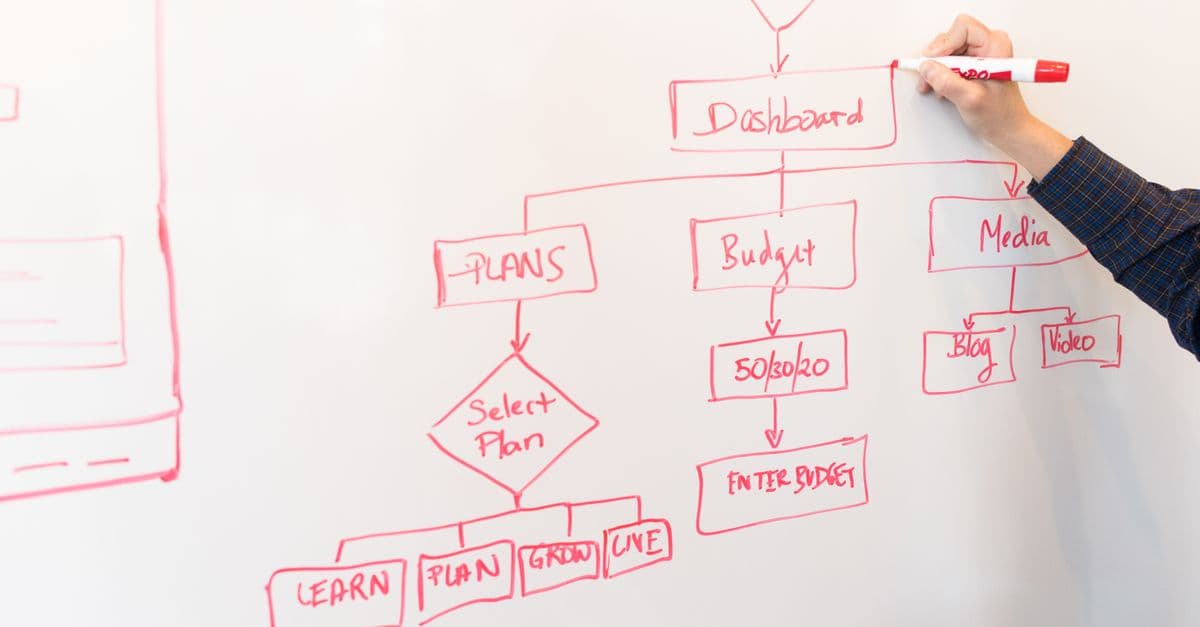
Not every process needs the same level of formality. A two-person approval chain inside a five-person startup does not need a full BPMN diagram with formal execution semantics; a simple flowchart on a whiteboard, photographed and saved, is proportionate. A cross-departmental process that touches finance, legal, and customer support, and that will eventually be handed to a workflow engine to execute, benefits from a more rigorous notation where roles, timing, and message-passing between systems are explicit.
| Notation | What it shows | Complexity | Best used for |
|---|---|---|---|
| Simple flowchart | Sequential steps and basic decision branches | Low | Single-owner processes, quick documentation, early discovery interviews |
| Swimlane diagram | Same as flowchart, but steps are grouped by which role or department owns them | Medium | Processes crossing two or more teams where handoffs are the risk area |
| BPMN (Business Process Model and Notation) | Formal events, gateways, tasks, and message flows using a standardized symbol set maintained by the OMG | High | Processes that will be handed directly to a workflow or BPM engine, or shared across tools/vendors |
| Value stream map | Process steps plus timing data: cycle time, wait time, and where value is added versus where it is not | Medium-High | Identifying waste and bottlenecks before automating, not just documenting what happens |
Swimlane diagrams deserve special mention for automation planning specifically, because the majority of process failures happen at handoffs between owners, not inside a single person's steps. If a swimlane diagram shows a task crossing from one lane to another, that boundary is exactly where automation tends to either add the most value, by removing a manual handoff delay, or introduce the most risk, if the two systems on either side of the handoff do not agree on what "done" means.
Value stream mapping, borrowed from lean manufacturing, adds a dimension the others do not: time. It distinguishes steps that add value to the customer from steps that exist only because of some organizational friction, like waiting for a signature that could have been automated years ago, or re-entering data that already exists in another system. A process map without timing data can tell you what happens; a value stream map can tell you where the process is actually slow, which is often a better place to spend automation effort than the parts of the process that are already fast.
Exceptions are the real content of the map
The steps that happen ninety-five percent of the time are usually easy to automate and rarely where projects get stuck. What derails automation efforts is the other five percent: the customer who pays with a check instead of a card, the invoice missing a purchase order number, the approval that needs to skip a step because it is an internal transfer rather than an external payment. If these exceptions are not explicitly mapped, the automation either crashes on them, generating a support ticket and manual cleanup, or, worse, processes them incorrectly without erroring at all, which is far harder to detect and fix after the fact.
A useful discipline borrowed from software requirements gathering is asking "what happens when this step gets bad input?" for every single step in the map, not just the ones that feel risky. Documenting the answer, even if the answer is "route to a human, we do not have a rule for this yet," turns a silent failure mode into an intentional design decision. This is also the point at which a process map connects directly to error-handling architecture; a map that identifies every exception path in advance is exactly the input a team needs to design proper fallback and retry logic (see why automation needs error queues for how that failure-handling layer should be structured once exceptions are known).
Exceptions also tend to reveal which parts of a process are genuinely rule-based, and therefore safe to automate outright, versus which parts require contextual judgment that current tooling cannot reliably replicate. An exception like "PO number is missing, reject and notify submitter" is a rule. An exception like "this customer has been difficult before, use discretion on the refund" is not a rule, it is a judgment call disguised as a policy, and mapping it honestly, rather than pretending it can be reduced to an if-statement, prevents a category of automation failure where the bot makes a technically correct but contextually tone-deaf decision.
Who should actually be in the room for this mapping exercise?
The people who perform the process day to day, not only their manager, because managers often describe the official version of a process while the people executing it know the informal workarounds that keep it running. Interviewing only leadership is a common cause of process maps that look clean on paper and fail the moment they meet real data.
In practice this usually means at least one working session with frontline staff where the facilitator asks them to walk through the last five times they did the task, including the times something went wrong, rather than asking them to describe the process in the abstract. People are much better at recalling specific recent instances accurately than at generalizing their own behavior into a clean procedure, and the gap between the two is often exactly where the useful exceptions live.
Verifying the map against reality with process mining
A process map built entirely from interviews carries a structural risk: it reflects what people believe the process is, or what they say it is, which is not always identical to what the systems actually recorded happening. Process mining is a technique, developed largely through the work of researcher Wil van der Aalst and colleagues at Eindhoven University of Technology, for reconstructing the real, as-executed process directly from event logs, the timestamped records that most enterprise systems (ERPs, CRMs, ticketing systems) already generate as a byproduct of normal use.
The mechanics are relatively straightforward in concept: pull every timestamped event tied to a case ID, such as a specific order or ticket, from the relevant system logs, group the events into sequences called traces (one trace per case), and use discovery algorithms to reconstruct the actual paths cases took through the process, including how often each path was taken and how long each step took. The result is frequently different, sometimes substantially, from the process map produced by interviews alone, because it reflects every actual path the data shows rather than the paths people remember or consider "normal."
Process mining is not a replacement for interview-based mapping, and it has real limits. It can only surface what the logs capture, so a step that happens entirely offline, such as a phone call or a conversation that never touches a system, will not appear in a process-mined diagram even if it is an important part of the real process. It also tends to produce "spaghetti" diagrams on messy, high-variance processes that are hard to read without additional filtering. But used together with interview-based mapping, it is one of the few genuinely evidence-based ways to check whether the map a team built in a conference room matches what the systems say actually happened, and discrepancies between the two are frequently where the most valuable automation opportunities, and the most dangerous blind spots, are found.
A simple process map structure
Regardless of which formal notation a team ends up using for the diagram itself, every process map, however it is drawn, should be able to answer the same five questions in writing. This table works as a template that can be filled out before a single diagramming tool is opened.
| Element | Question it answers | Example |
|---|---|---|
| Trigger | What starts this process? | New expense report submitted via form |
| Steps | What happens, in order, and who owns each step? | Manager reviews, then finance verifies receipts, then payment is scheduled |
| Decision points | Where does the path branch, and on what condition? | If amount exceeds $500, requires a second approver |
| Exceptions | What breaks the normal path, and what happens then? | Missing receipt: route to submitter for resubmission |
| Exit condition | What state means the process is complete? | Reimbursement marked "paid" in the accounting system |
Filling this table out before opening a diagramming tool has a practical benefit beyond organization: it forces a team to notice gaps in plain language before those gaps get hidden inside a visually polished diagram. It is much easier to say "we don't actually know what happens if the second approver is on vacation" out loud in a table cell than to notice that the same gap has been silently glossed over by a confident-looking arrow in a flowchart. Once the table is filled, translating it into whichever notation fits the process, from a whiteboard sketch to a full BPMN diagram, is largely mechanical, and the diagram tends to come out cleaner because the hard thinking already happened in words. From there, the map connects naturally to the next stage of automation design, deciding which triggers should fire the automation and how the system should react to each one (see how event-driven automation works), and to deciding which decision points in the map genuinely need a human in the loop rather than a rule (see how approval workflows prevent automation mistakes).
Common mistakes teams make when mapping a process for automation
A few failure patterns show up repeatedly across process-mapping efforts, and most of them are avoidable once a team knows to watch for them.
- Mapping the policy instead of the practice. The employee handbook describes what should happen; the mapping exercise needs to capture what actually happens, including the deviations, because the automation will be built against whichever one gets documented.
- Treating every exception as equally rare. Some "exceptions" occur on ten percent of cases and deserve their own automated path, not a generic human-review fallback that quietly becomes the busiest queue in the system.
- Stopping the map at the department boundary. A process that hands off from sales to fulfillment does not end when it leaves sales; mapping only one team's portion produces an automation that works internally and fails at every handoff.
- Confusing a rule with a judgment call. As covered above, some steps that look like decision points are actually contextual judgment, and automating them as if they were simple rules produces technically compliant but practically wrong outcomes.
- Never validating the map against the data. A map built purely from memory and interviews, with no process-mining or log-based sanity check, carries forward whatever gaps exist in human recollection.
None of these mistakes are exotic; they are the ordinary, predictable ways that a documentation exercise done under time pressure comes up short. Knowing the list in advance is often enough to catch most of them during the mapping session itself, rather than after the automation has already shipped.
The takeaway
A process map is not busywork before the "real" automation work begins, it is the specification the automation will actually be built against, and the quality of that specification determines whether the automation replicates a good process quickly or replicates a broken one just as quickly. Formal notations like BPMN exist precisely because informal descriptions tend to hide exactly the details, exception paths, handoffs, and judgment calls, that make or break an automated version of the process. Time spent explicitly mapping trigger, steps, decisions, exceptions, and exit conditions, ideally checked against what event logs actually show through process mining, is reliably cheaper than discovering those gaps after the automation is already live and processing real customer data incorrectly.
Read next:
- Why automation needs error queues
- How event-driven automation works
- How approval workflows prevent automation mistakes
FAQ
Q: What is the first thing to define when mapping a process for automation?
Start with the exact trigger that starts the process and the exact condition that marks it complete. Teams that skip this often build automations for processes with no clearly defined ending, because a human previously just knew when the work was "done."
Q: Why do exceptions matter more than the main path when mapping a process?
The common path is usually straightforward to automate. Exceptions, like missing data, unusual customer requests, or conditional approval rules, are where automations silently fail or misprocess data if they are not explicitly documented and handled during mapping.
Q: Who should be involved in mapping a business process?
The people who actually perform the process daily should be included, not only their managers. Frontline staff often know informal workarounds and edge cases that leadership's official description of the process omits.
Q: What is BPMN and when should a team use it instead of a simple flowchart?
BPMN (Business Process Model and Notation) is a formal diagramming standard maintained by the Object Management Group since 2005, with execution semantics added in version 2.0. It is worth the added complexity when a process crosses multiple teams or will be handed directly to a workflow automation engine; a simple flowchart is usually enough for a single-owner process.
Q: What is process mining and how is it different from interview-based process mapping?
Process mining reconstructs the actual, as-executed process directly from timestamped event logs already recorded by enterprise systems, rather than relying on what people say happens. It often reveals paths and delays that interview-based maps miss, though it cannot capture steps that happen entirely outside a logged system, such as an offline conversation.
Q: What tools are commonly used to create a process map?
Flowchart tools like Lucidchart or Miro are common for simpler processes, using standard symbols such as rectangles for actions and diamonds for decision points. More complex, cross-team processes destined for automation platforms typically use BPMN, a formal notation maintained by the Object Management Group.
Follow new articles
Add SciHub101 to your feed reader to see new science and technology stories.
About the Author
SciHub101 is an independent science and technology publication founded and edited by Buğra Sözeri, a software engineer and app developer based in Türkiye. AI tools assist with drafting and research. Source documentation in the existing archive is uneven, and articles are being reviewed and corrected. The Editorial Team byline identifies editorial responsibility; it does not certify specialist or independent human review. Where we compare products, anything built by our own team is labelled as such — see the editorial guidelines and About page for how corrections and disclosures work.
Related Articles