How 3D Printing Works — Additive Manufacturing
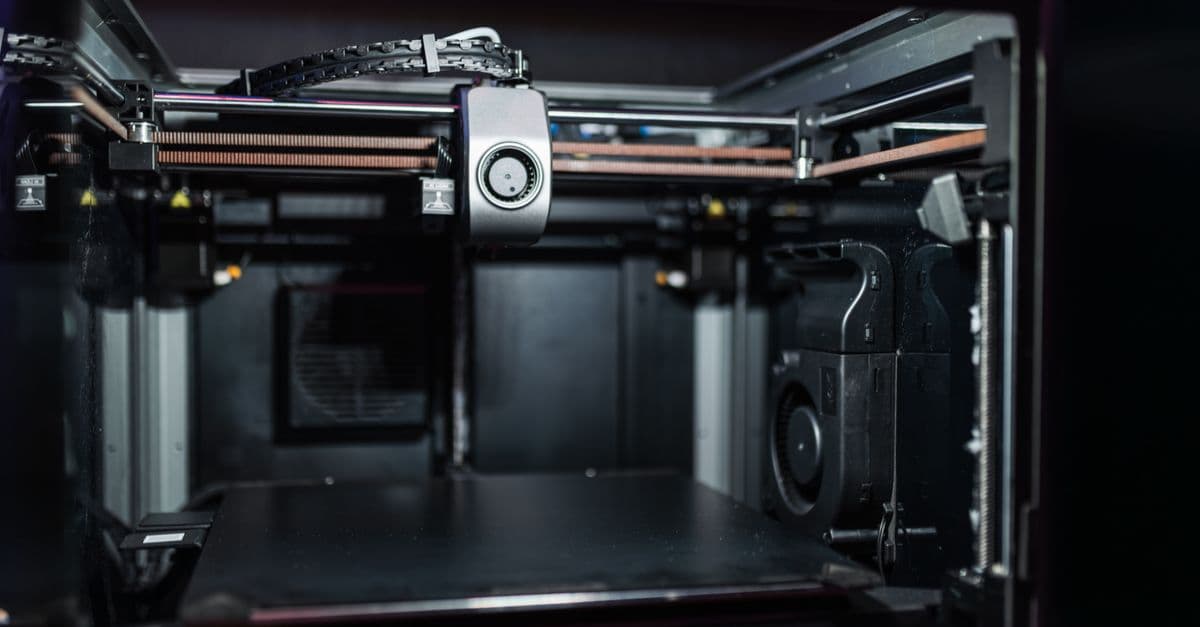
Photo: Matheus Bertelli / Pexels
3D printing, also called additive manufacturing, builds physical objects layer by layer from a digital file. The process takes a three-dimensional computer model (CAD file), converts it to instructions, and deposits or cures material in precise layers until the finished object emerges. It is the inverse of subtractive manufacturing like CNC machining, which starts with a solid block of material and removes everything that isn't part of the desired shape. Additive manufacturing starts from nothing and deposits material only where the final object needs it.
This fundamental reversal — adding instead of removing — unlocks capabilities impossible for traditional machining: complex internal geometries, topology-optimized lattices, organic flowing shapes, and parts with integrated channels. It also dramatically reduces material waste and tooling time. What once required weeks of CAD-to-part engineering now takes hours. Objects that would cost thousands to injection-mold can be prototyped or produced in small batches for a fraction of the cost. This shift has reshaped prototyping workflows, revolutionized custom medical devices, enabled mass customization in hearing aids and dental aligners, and changed aerospace component design forever.
A Short History: From Laboratory to Kitchen
3D printing did not emerge overnight. The technology developed in parallel across multiple inventors and approaches.
1984–1987 — The Birth of Stereolithography: Chuck Hull, an engineer, invented stereolithography (SLA) — using a UV laser to selectively cure photopolymer resin layer by layer. Hull founded 3D Systems and patented the process. The first commercial stereolithography machine (SLA-1) was sold in 1987 at a cost of roughly $300,000 — a specialized industrial tool, not a consumer device.
1989 — FDM Invention: Scott Crump invented Fused Deposition Modeling (FDM) — the process of extruding melted thermoplastic through a nozzle to build parts layer by layer. Crump co-founded Stratasys and patented FDM, which would later dominate the consumer market because it was mechanically simpler than laser-based approaches.
1990s–2000s — Industrial Dominance: 3D printing remained solidly industrial and expensive. Part quality was poor, speeds were glacial (days for large parts), and machines cost tens of thousands to hundreds of thousands of dollars. Applications remained niche: aerospace prototype testing, dental and medical modeling, and high-end automotive design.
2009 — The Patent Cliff: Core FDM patents expired, freeing inventors and entrepreneurs to design open-source and low-cost machines. RepRap — an open-source self-replicating printer project — released designs that anyone could build from machined parts and electronics. MakerBot commercialized the RepRap concept and began shipping affordable consumer FDM printers. The maker movement exploded: hackerspaces and schools filled with $1,000–$3,000 FDM printers.
2010s — Maturation and Fragmentation: Consumer FDM improved steadily (better nozzles, heated beds, closed-loop controls). Meanwhile, resin printing (SLA, DLP, MSLA) was democratized. Companies like Formlabs (2012) brought professional-grade stereolithography down to $3,000–$4,000. Open-source alternatives followed, with Chinese manufacturers releasing sub-$500 resin printers.
2020–2026 — The Speed and Accessibility Revolution: Bambu Lab disrupted desktop FDM with the P1S (2023) and X1 Carbon — printers using CoreXY mechanics (linear motion on both X and Y axes simultaneously) that achieved print speeds of 150–200 mm/s with exceptional quality. Anycubic and Elegoo released resin printers (Photon Mono M5s, Mars 5 Ultra) delivering sub-50-micron detail for under $500. Entry-level FDM is now $150–$300. The technology has moved from industrial novelty to prosumer commodity.
Source: Wohlers Associates (2024) — 3D Printing and Additive Manufacturing Industry Report; historical patent records.
The Core Workflow: From Digital to Physical
Every 3D print follows the same basic pipeline, though implementation details vary by technology:
1. 3D Model Creation
The process begins with a digital 3D model. Sources include:
- CAD software (parametric modeling): Fusion 360 (free for personal/educational use), Onshape (browser-based), FreeCAD (open-source), SolidWorks (commercial), OpenSCAD (programmatic CAD)
- Sculpting/organic modeling: Blender (free, open-source), ZBrush (commercial, industry-standard for character design), Autodesk Meshmixer (now legacy, being phased out)
- Downloaded models: Printables (Prusa's community platform), Thingiverse (legacy MakerBot community), MakerWorld (Bambu Lab ecosystem), MyMiniFactory (curated designs), Sketchfab (3D model library)
Design for 3D printing requires different thinking than traditional manufacturing. Overhangs require support structures (material scaffolding that's removed later). Thin walls can fail during printing. Internal channels must have drainage holes. Tolerances are loose compared to CNC — typically ±0.5 mm is acceptable.
2. File Export
The 3D model is exported to an interchange format readable by slicing software:
- STL (Stereolithography): Triangle-based mesh format. Oldest, most universal. Carries only geometry, no color or material info. File sizes can be large.
- 3MF (3D Manufacturing Format): Modern standard (open-source, ISO-approved). Stores geometry, color, texture, material properties, and metadata. Much smaller files than STL. Increasingly adopted by modern slicers.
- OBJ, STEP, IGES: Other formats, less commonly used for 3D printing.
3. Slicing & G-code Generation
Slicing software takes the 3D model and mathematically slices it into dozens, hundreds, or thousands of horizontal layers (typically 0.1–0.4 mm thick for FDM, 25–50 µm for resin). For each layer, the software:
- Calculates the 2D cross-section (the outline of material needed at that height)
- Determines whether the layer is outer perimeter, infill, or void
- Generates toolpaths — the paths the printer will follow
- Calculates extrusion rate (how much plastic flows), speed (how fast the nozzle moves), temperature, print order
- Generates support structures — temporary scaffolding to hold overhangs and bridges
The slicing software outputs G-code — a line-by-line instruction set for the printer's microcontroller:
G0 Z0.2 ; Move to starting height
G0 X10 Y10 ; Move to starting XY position
M104 S210 ; Heat nozzle to 210°C
G28 ; Home all axes
G29 ; Auto-level bed
G0 Z0.2 F3000 ; Travel to print start
G1 X20 Y20 Z0.2 E30 F1500 ; Extrude line with filament (E=30)
Popular slicers: OrcaSlicer (fastest, very capable), PrusaSlicer (excellent FDM optimization), Bambu Studio (Bambu-specific), Cura (Ultimaker, widely used), Simplify3D (commercial, powerful optimization).
4. Print Execution
The printer reads G-code and executes it. For FDM: heaters warm the nozzle and bed, the filament is pushed through, layer by layer deposits. For resin: a vat of liquid resin is exposed to UV light (laser, projector, or LCD array), curing precise layers, then the build platform lifts to create space for the next layer.
Print time depends on size, layer height, infill density, and print speed. A small toy might take 30 minutes. A large engineering bracket might take 24–48 hours.
5. Post-Processing
The raw print is not the final part:
- Support removal: Snapping off or dissolving temporary structures
- Washing (resin): Cleaning excess uncured resin with IPA or specialized washers
- Curing (resin): UV exposure to fully polymerize the part
- Sanding/smoothing: Sanding layer lines for aesthetic finish or coating with acetone vapor (ABS) or other smoothing agents
- Painting/dyeing: Adding color and surface effects
- Annealing (some filaments): Heat-treating to improve mechanical properties
A printed part might require 30 minutes to several hours of post-processing before it's truly finished.
The Major Technologies: How They Work
1. FDM / FFF — Fused Deposition Modeling / Fused Filament Fabrication
How it works: Plastic filament (typically 1.75 mm or 2.85 mm diameter) is fed by a stepper motor through a hot end — a heating block with a nozzle tip (0.4–1.2 mm opening). The filament melts at 200–250 °C (depending on plastic type), and the nozzle deposits material as it moves horizontally while the print bed lowers slightly between layers.
Advantages: Cheapest entry point ($150–$400), works with diverse materials (PLA, PETG, ABS, TPU, nylon, carbon-fiber composites, metal-filled), good mechanical properties, easy support removal.
Disadvantages: Layer lines are visible on the finished surface, anisotropic strength (weaker perpendicular to layers), slow compared to resin (50–150 mm/s typical), large build volume but limited resolution (0.1–0.4 mm practical minimum layer height).
Popular machines 2024–2026: Bambu Lab P1S and X1 Carbon (exceptional speed, 150–200 mm/s, multicolor), Prusa MK4S (reliability and open-source), Creality K2 (affordable, 250 mm/s).
Source: Bambu Lab, Prusa Research (2024) — Printer specifications and performance benchmarks.
2. SLA / DLP / MSLA — Resin Printing (Photopolymerization)
How it works: A vat contains liquid photopolymer resin (clear, yellowish, or colored). Ultraviolet light — from a laser (traditional SLA), a DMD projector (DLP), or an LCD mask (MSLA) — shines from below or above, selectively curing (solidifying) the resin. After each layer, the build platform moves (up or down), the uncured resin flows to refill, and the next layer cures.
SLA vs. DLP vs. MSLA trade-offs:
- SLA (laser-based): Most precise, but slowest (laser has to scan the entire outline). Used by Formlabs Form 4.
- DLP (projector-based): Faster than SLA (entire layer flashed at once), good detail. Less common in consumer market.
- MSLA (LCD mask): Fastest (LCD pixel array covers entire layer), cheapest to manufacture. Now the consumer standard (Anycubic Photon Mono M5s, Elegoo Mars 5).
Advantages: Extremely high detail (25–100 µm resolution, some printers down to 12–25 µm). Perfect for miniatures, dental aligners, surgical guides, jewelry molds, figurines. Superior surface finish vs. FDM.
Disadvantages: Resin is toxic/caustic (requires gloves and ventilation). Prints are more fragile initially (need UV curing post-print). More post-processing (washing, curing). Resin costs more than filament. Disposal of excess resin is an environmental concern.
Popular machines: Anycubic Photon Mono M5s ($300, 9K resolution), Elegoo Mars 5 Ultra ($180, high performance), Formlabs Form 4 (~$4,000, professional-grade).
3. SLS — Selective Laser Sintering (Powder Bed Fusion)
How it works: A bed of powder (usually nylon) sits in a heated chamber (around 170 °C, just below the powder melting point). A CO₂ laser scans across the powder surface, fusing grains together wherever the part exists. After each layer, a roller spreads fresh powder over the area, and the bed lowers. Unlike FDM and resin, the unfused powder surrounding the part acts as natural support — no separate support structures needed.
Advantages: Support-structure-free printing of complex geometry. Excellent mechanical properties (isotropic strength). Large variety of materials (nylon 12, nylon 11, TPU, glass-filled nylon, metals). Ideal for end-use functional parts and production runs.
Disadvantages: Slow (similar speed to large resin printers). Requires heated chamber (expensive equipment). Unused powder must be managed or recycled. Equipment cost is high ($5,000–$50,000+). Post-processing includes powder cleanup and sometimes coating/dyeing.
Industrial players: EOS (P series, largest market share), Formlabs Fuse 1+ (desktop SLS, ~$30,000), HP's Multi Jet Fusion (faster but not SLS).
4. MJF — Multi Jet Fusion (HP's Powder Bed Approach)
How it works: HP's variant deposits binding and fusing agents onto powder via inkjet heads (similar to inkjet printer nozzles). A heating element then fuses the powder. Faster than traditional SLS because the entire layer can be bound and fused simultaneously rather than with a slow laser scan.
Advantages: Speed (significantly faster than SLS), good detail, similar mechanical properties to SLS.
Disadvantages: Less mature ecosystem, higher equipment and material costs, limited supplier base.
5. Metal Printing — DMLS, EBM, Binder Jetting
Direct Metal Laser Sintering (DMLS): A laser fuses metal powder (titanium, aluminum, stainless steel, cobalt-chrome, nickel-based superalloys) layer by layer in a controlled chamber. The process is similar to SLS but with metal powder and precise temperature management to prevent oxidation.
Electron Beam Melting (EBM): Uses a high-energy electron beam instead of a laser, achieving higher temperatures and better metallurgical properties. Used primarily in aerospace and medical.
Binder Jetting: Deposits binding agents onto metal powder, then the entire build is sintered in a furnace afterward. Faster than DMLS/EBM but requires post-sintering.
Applications: Aerospace engine components, orthopedic implants, custom dental bridges, lightweight lattice brackets, production tooling inserts.
Vendors: GE Additive (laser systems), Markforged (metal FDM with sintering), Desktop Metal (binder jetting), EOS (DMLS/metal sintering).
Cost: Equipment $200,000–$1,000,000+. Material is expensive (metal powder ~$50–150/kg vs. plastic filament at $15–25/kg). Limited to specialized applications.
Source: ASTM F2792 — Standard Terminology for Additive Manufacturing Technologies; GE Aviation case studies (2024).
6. Bioprinting
How it works: Similar to FDM but deposits "bioink" — hydrogel (alginate, collagen, gelatin) containing living cells. Cells remain viable within the hydrogel scaffold, forming the basis for tissue engineering.
Status: Largely research and early clinical stage. Companies like CELLINK and TeVido Biotech are advancing toward functional skin, cartilage, and eventual organ-on-chip systems.
Challenges: Cell viability during and after printing, mechanical strength of hydrogel scaffolds, regulatory approval for human implants.
Future potential: Custom-printed bone, cartilage, skin, and even organ structures for transplantation.
Comparison Table
| Technology | Resolution | Material | Strength | Cost | Best For |
|---|---|---|---|---|---|
| FDM / FFF | 0.1–0.4 mm | Thermoplastic filament | Good | $150–$2,000 | Prototypes, functional parts |
| SLA / MSLA | 25–100 µm | UV resin | Brittle | $200–$4,000 | Miniatures, dental, jewelry |
| SLS | 100 µm | Nylon powder | Excellent | $5,000+ | Functional production parts |
| MJF | 80 µm | Nylon powder | Excellent | $50,000+ | Production runs |
| DMLS | 20–50 µm | Metal powder | Industrial | $200,000+ | Aerospace, medical, tooling |
| Bioprinting | Cellular | Hydrogel + cells | N/A | Research | Tissue scaffolds |
Common Materials
- PLA — Easiest filament. Biodegradable corn-derived. Low temp resistance.
- PETG — Durable, water-resistant, slightly flexible.
- ABS / ASA — Heat resistant, harder to print (warps, needs enclosure).
- TPU — Flexible rubber-like.
- Nylon — Tough, abrasion-resistant.
- PC, PEEK, PEI / ULTEM — Industrial high-temperature engineering plastics.
- Resins — Standard, tough, flexible, castable (for lost-wax jewelry), dental, ceramic-filled.
What 3D Printing Is Good At
- Prototyping — Hours from CAD to part instead of weeks of tooling.
- Custom geometry — Lattices, internal channels, organic shapes that no mill can make.
- One-offs and small batches — No tooling cost.
- Replacement parts — Discontinued knobs, brackets, gears.
- Mass customization — Hearing aids, dental aligners, prosthetic sockets.
What It Is Not Good At (Yet)
- High-volume production — Injection molding still wins past a few thousand parts.
- Isotropic strength — FDM parts are weaker along the layer direction. Functional load-bearing requires careful orientation or different processes.
- Surface finish — Layer lines visible. Post-processing (sanding, vapor smoothing, painting) often required.
- Very large parts — Build volumes are limited, though large-scale concrete printers exist.
Real Applications
- Aerospace — GE's LEAP engine fuel nozzles are 3D printed, reducing 20 parts to 1 and cutting mass 25%.
- Medical — Over 99% of in-ear hearing aids have been 3D printed since around 2010. Custom titanium spinal implants, prosthetics, surgical guides.
- Construction — ICON has printed entire neighborhoods in Texas. Mars habitat prototypes use the same technology.
- Food — Scaffolds for cultured meat (Aleph Farms), chocolate, pasta.
- Education — Every makerspace, school, and university lab.
- Automotive — Bugatti titanium brake calipers, Bentley custom interior parts.
Software Ecosystem
| Stage | Free | Paid |
|---|---|---|
| CAD | FreeCAD, Onshape (free tier), Blender | Fusion 360, SolidWorks |
| Slicing (FDM) | OrcaSlicer, PrusaSlicer, Cura | Simplify3D |
| Slicing (resin) | Lychee (free tier), Chitubox | Lychee Pro |
| Repair | Meshmixer (legacy), 3D Builder | Netfabb |
Frequently Asked Questions
Q: How long does a 3D print take?
A: Print time varies dramatically by technology and size. A small toy on a fast FDM printer might finish in 30 minutes. A detailed miniature figurine on a resin printer typically takes 4–8 hours. Large engineering brackets can run for 24–72 hours. Metal printing is similarly slow or slower. The layer height, infill density, and print speed all dramatically affect total time.
Q: Is 3D printing cheap or expensive?
A: Entry-level FDM printers start at $150–$300, making it accessible as a hobby. Filament material costs roughly $15–25/kg, producing dozens of small parts per kilogram. However, a professional resin printer costs $300–$4,000, and true metal printing requires six-figure industrial equipment. Time for post-processing (support removal, sanding, painting) is an often-underestimated cost.
Q: Can you print actual metal at home?
A: No. Some FDM filaments are "metal-filled" (PLA or resin mixed with bronze, steel, or copper powder), but these are not structurally metallic — the plastic is the primary load-bearing material. True metal 3D printing (DMLS, EBM, binder jetting) requires specialized equipment costing $200,000 to $1,000,000+ and is limited to industrial shops and aerospace companies.
Q: Why are FDM prints weaker in one direction than another?
A: FDM bonds consecutive layers thermally — the new extrusion melts slightly into the previous layer below. However, this inter-layer bond is mechanically weaker than the strength within a single layer (between extruded filament strands). Load applied perpendicular to the layer planes can delaminate the part. Experienced designers orient parts so stress loads along the layer planes, not across them, or use specific infill patterns and line orientations to maximize strength.
Q: What is the practical difference between FDM and SLA printing?
A: FDM extrudes melted plastic filament — parts are durable, mechanically strong, and materials are cheap, but surface finish has visible layer lines and detail is coarse (0.1–0.4 mm resolution). SLA cures liquid resin with UV light — results in exceptional detail (25–100 µm), beautiful surface finish, but prints are more fragile before post-curing, resin is toxic and requires careful handling, and material cost is higher. FDM is for functional parts; SLA is for detail and aesthetics.
Q: Will 3D printing eventually replace traditional manufacturing like injection molding?
A: No — the two will coexist and complement each other indefinitely. Injection molding dominates for high-volume production (10,000+ units) because tooling amortizes across large runs and per-unit cost is very low. 3D printing excels at prototyping, small batches (1–1,000 units), customization, and complex geometries. The future is hybrid: products are prototyped and iterate in 3D printing, then move to injection molding or machining for production scale.
The takeaway
3D printing is no longer a laboratory curiosity — it's a practical manufacturing tool that has moved from industrial shops to home desks. The technology works by adding material layer by layer, enabling geometries and customization impossible with traditional subtractive methods. Different approaches (FDM, resin, SLS, metal) offer different trade-offs between speed, detail, cost, and material properties.
For anyone designing physical things — product designers, engineers, medical professionals, creators — understanding which 3D printing technology fits the job is now a critical skill. A prototype that once took weeks to machine can now be printed overnight. An aerospace component that once required 20 machined parts and careful assembly is now a single additively manufactured piece. That shift — from subtractive to additive thinking — is redefining how humans build.
Read next:
- How CNC Machining Works: Subtractive Manufacturing
- How Injection Molding Works: Plastic Manufacturing at Scale
- CAD Software Explained: Design Tools for the Digital Age
Read next:
Follow new articles
Add SciHub101 to your feed reader to see new science and technology stories.
About the Author
SciHub101 is an independent science and technology publication founded and edited by Buğra Sözeri, a software engineer and app developer based in Türkiye. AI tools assist with drafting and research. Source documentation in the existing archive is uneven, and articles are being reviewed and corrected. The Editorial Team byline identifies editorial responsibility; it does not certify specialist or independent human review. Where we compare products, anything built by our own team is labelled as such — see the editorial guidelines and About page for how corrections and disclosures work.
Related Articles

How Airplanes Fly — Physics of Flight
The real physics behind lift, thrust, and drag — what every textbook gets wrong and what actually keeps 400-ton jets in the sky.
How Electricity Works — Electrons and Current
How electricity works: voltage, current, resistance, AC vs DC, power generation, the grid, and why birds don't get electrocuted.
The 3D Printer: How Additive Manufacturing Changed Everything — SciHub101
How Chuck Hull's 1984 stereolithography patent grew into a technology that builds jet engine parts, human tissue, and entire houses layer by layer.
Countries with the Most Robots in Manufacturing (Robot Density Ranked)
South Korea has 1,012 industrial robots per 10,000 manufacturing workers — the highest robot density ever recorded for a major economy. That is more than six times the global average of 162, and more than double Germany's figure. The IFR World Robotics 2024 report shows a world where automation in factories is accelerating faster than at any point in industrial history.

Countries With the Most Industrial Robots Per Worker (IFR World Robotics 2025)
South Korea runs 1,220 industrial robots per 10,000 manufacturing employees — the highest robot density on earth. See the IFR ranking, how the metric works, and why China's figure fell from 470 to 166.
Countries That Produce the Most Semiconductors (2026)
Taiwan held 92% of the world's most advanced chip capacity in a 2021 study, South Korea dominates memory, and one Dutch company makes the only EUV lithography machines. Who controls which layer of the chip supply chain, with sourced figures.